Updated: 13 July 2026
I’m all about using technology to make fishkeeping easier, but I’m also about the logic of accuracy. Many hobbyists reach for a digital aquarium water tester because they are tired of comparing color charts to a tiny glass tube. I get it—after 15 years and four active tanks, including a sensitive 20-gallon long, I’ve tested almost every probe on the market. But here is the truth: a digital tester is only as good as its last calibration. In this guide, I’m breaking down which digital testers actually belong in a veteran’s fish room and which ones are just expensive paperweights.
Quick Answer: Best Digital Aquarium Water Testers at a Glance
- Storage Secret: Never let a pH probe dry out. Always store the tip wet in a dedicated KCl (Potassium Chloride) solution.
- Best for Total Precision: Hanna Checkers (Colorimeters that eliminate human eye error by using light technology).
- Best Professional Pen: Apera Instruments AI316 (Waterproof casing with a fully replaceable probe tip).
- Best Continuous Monitor: Kactoily WiFi Monitor (Stays inside the tank and sends live alerts directly to your phone).
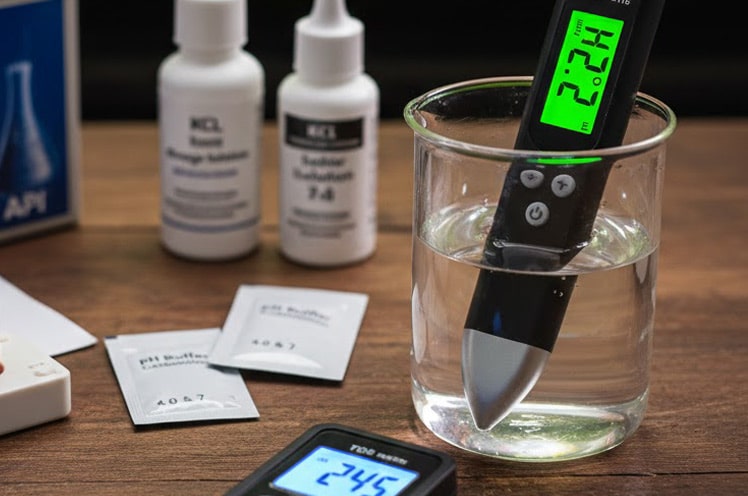
- The #1 Rule: Digital probes are not “set and forget.” You must perform a two-point calibration monthly using 7.0 and 4.0 fluid, or the sensor will drift.
| Tester | Best for | Price | |
|---|---|---|---|
| Hanna Checkers | Eliminating eye error on hard-to-read parameters | ~$75 | Check price |
| Apera AI316 | Daily multi-tank use, replaceable probe | ~$145 | Check price |
| TDS Pens | Quick, cheap mineral/TDS spot checks | $15–$20 | Check price |
| Kactoily WiFi Monitor | 24/7 remote alerts for sensitive or expensive fish | From $179.99 | Check price |
Jump To Reviews
Disclosure: AquaLogicHQ.com is a participant in the Amazon Services LLC Associates Program, as well as other affiliate programs, designed to provide a means for us to earn fees by linking to Amazon.com and affiliated sites at no extra cost to you. Please see the Affiliate Disclosure for more details.
The Hard Truth About Electronic & Digital Aquarium Water Testers
Before you buy a digital tester, you need to know what the Amazon reviews won’t tell you. A digital probe is like a high-performance engine; it needs a “tune-up” from time to time.
1. Calibration is Non-Negotiable
The biggest mistake I see? Buying a digital pH pen and never calibrating it. The logic is simple: electrodes ‘drift’ over time. I’ll show you why I keep a bottle of 7.0 and 4.0 calibration fluid on hand and why I always double-check my digital readings with a Liquid Master Test Kit once a month. If you aren’t willing to calibrate, stay with the liquid kits.
Quick Tip: I calibrate my pH pens on the first Saturday of every month. If you haven’t calibrated in 90 days, you can’t trust the reading.
2. The Storage Solution Secret
This is where most beginners fail. If you leave a pH probe dry, the sensitive glass bulb will dehydrate and start to die.
Quick Tip: Never store your probe in tap water or RO/DI water. I use a KCl (Potassium Chloride) storage solution. A small $10 bottle will last a year and save you from buying a new $80 tester.
3. The Accuracy Lie: A Dying Sensor Doesn’t Fail, It Lies
Here’s what separates a digital tester from a liquid kit or strip when something goes wrong: a bad liquid result looks bad. The color’s off, the shade’s ambiguous, your gut tells you to retest. A degrading sensor doesn’t do that. It still hands you a clean, confident, two-decimal-point number on the screen — it’s just quietly wrong. That’s the real meaning behind ‘Accuracy Tested’ in this guide’s title. A controlled 13-week drift study found glass pH probes drift by roughly 0.4 pH units on average if left uncalibrated — confirming that a probe can look confident and still be meaningfully off. I’m not just checking whether a tester reads accurately on day one out of the box; I’m checking how it fails six months in.
The tell isn’t the number — it’s the speed. A healthy probe settles on a reading fast. A drifting one gets sluggish before it ever gets wrong.
Quick Tip: If your pH pen used to settle in under 15 seconds and now takes 45 seconds or more to land on a number, that response lag is the real warning sign — not whatever digit it eventually shows you.
4. The Hidden Cost Truth: A $145 Pen Isn’t a $145 Purchase
Every review compares testers by sticker price, and that’s a logic error. The Apera’s $145 tag and the Hanna’s $75 tag are just the entry fee. After that, you’re buying 7.0 and 4.0 calibration fluid every month, KCl storage solution to keep the probe alive, and eventually a replacement tip when the original wears out. None of that shows up in the “best of” comparison charts, but it shows up on your credit card.
Quick Tip: Budget roughly $20–$30 a year in calibration fluid and storage solution alone, on top of the tester itself. If a “deal” pen doesn’t account for that ongoing cost, it’s not actually cheaper than the Apera over two years — it just front-loads the savings.
5. The Humidity Truth: Fish Rooms Are Hard on Electronics
This one nobody talks about: a fish room is, by design, a humid environment. Great for your tanks, rough on anything with a battery compartment and a circuit board. Over months of splashes and ambient moisture, battery contacts corrode quietly inside the housing, long before the sensor itself ever drifts. This is the other half of “expensive paperweight” — sometimes it’s not the probe that dies, it’s the electronics around it.
Quick Tip: If a tester starts acting flaky and you’ve already ruled out the battery itself, pop the compartment open and look for a faint green or white crust on the contacts. A quick wipe with a pencil eraser or contact cleaner fixes it more often than people expect.
My Top Picks for 2026
1. Hanna Checkers (Colorimeters)
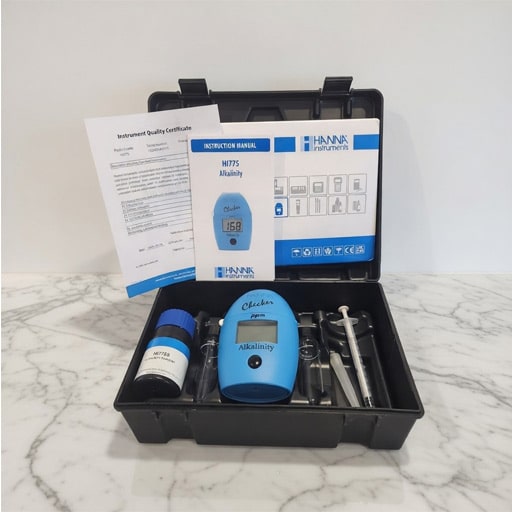
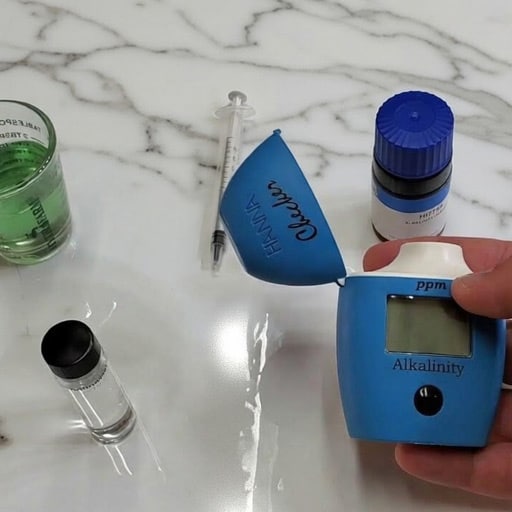
Hanna doesn’t use a probe; they use light. You add a reagent to your water, and a sensor “reads” the color for you. My Favorite is the HI755 Alkalinity Colorimeter.
- Why I Love It: It removes “human eye error.” If it says 8.2 pH, it’s 8.2 pH.
- What I Use It For: I use the Hanna HI775 for my 50-gallon community tank when I need to be 100% sure about specific levels like Phosphate or Alkalinity.
- Cost: About $75.00
- 4.2 Stars (83 Amazon Reviews)
- System Compatibility: Perfect for both advanced freshwater layouts and delicate marine reef tanks.
2. Apera Instruments AI316
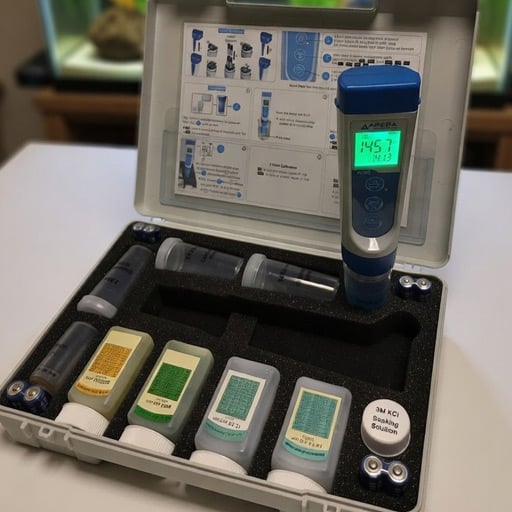
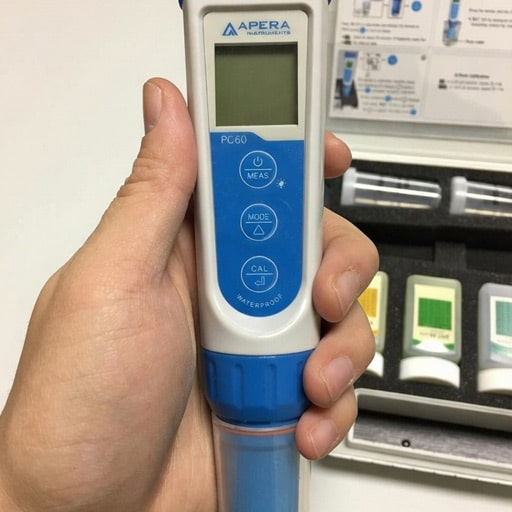
This is a professional-grade “pen” style tester.
- Why I Love It: The probe is replaceable. On cheap $15 testers, when the probe dies, you throw the whole thing away. With the Apera, you just swap the tip.
- How I use it: I use this for all four of my fish tanks weekly to get the exact number for the levels in my water.
- Cost: About $145.00
- 4.5 Stars (1,202 Amazon Reviews)
- System Compatibility: Ideal for multi-tank freshwater rooms, but requires aggressive freshwater rinsing if exposed to corrosive saltwater
3. Vivosun Kit – pH and TDS Pen
These are the cheapest digital tools ($15–$20) and are often overlooked. I have used the VIVOSUN pH and TDS Pens. I have to say they are not the best, BUT, for the price, you can’t beat them.
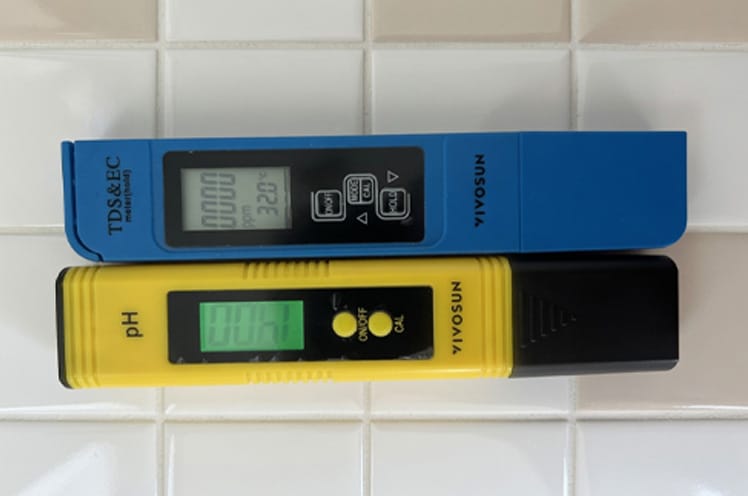
- Why I Like This Kit: It works well enough for the price.
- The Cons: It’s not built to last.
- Cost: About $16.00
- 4.1 Stars (24,589 Amazon Reviews)
- System Compatibility: Freshwater only, really. In a saltwater or reef tank, the baseline TDS from the salt itself swamps the reading, so this tool can’t tell you anything useful about nutrient creep or cycling progress — it’s just background noise at that point.
- My Hack For TDS Pens: A TDS pen doesn’t tell you what is in the water, but it tells you how much stuff is in there. In my nano tank, if I see the TDS jump significantly, I have a good idea that my aquarium substrate might be leaching minerals, or a water change is overdue.
- How You Can Use Them: A TDS pen doesn’t tell you exactly what minerals are in your water column, but it tracks the total concentration. In my nano setups, I use a basic TDS pen to track mineral creep. If the number spikes between water changes, it’s a clear logical signal that evaporation is concentrating waste or my substrate is leaching. If you’re on a tight budget, skip the generic cheap pens and stick to a reliable liquid starter kit until you’re ready to invest in a pro-grade probe.
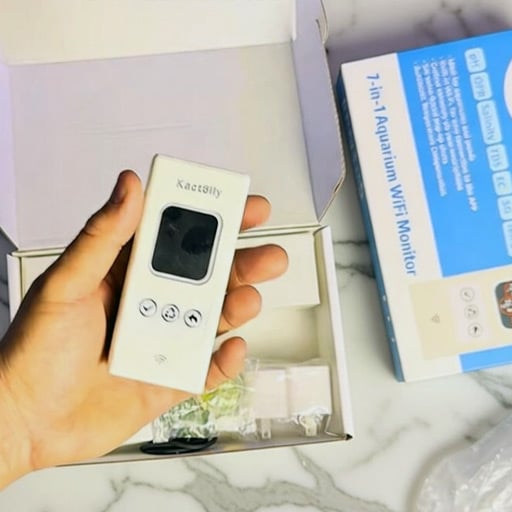
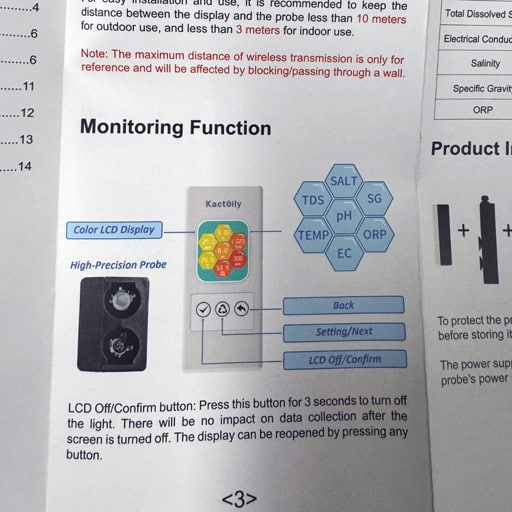
4. Best High-Tech: Kactoily WiFi Monitor
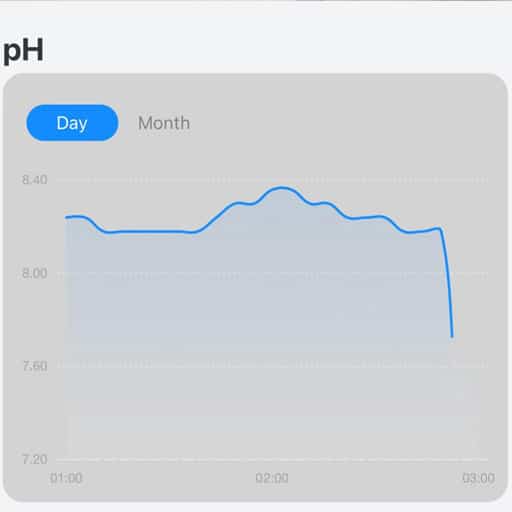
If you have a high-end tank, this is a lifesaver. It stays in the tank and sends alerts to your phone.
- My Personal View: It’s pricey, but if you’re keeping sensitive or expensive fish, the “low-threshold” alerts are worth super valuable. I use this in my 50-gallon community tank to keep an eye on everything.
- My honest gripe: the 3.6 stars aren’t a fluke. Amazon reviewers flag pH accuracy as inconsistent, and calibration gets mixed reviews, too. That tracks with truth #3 above: a drifting sensor doesn’t announce itself, it just quietly hands you a wrong number with full confidence. My take is to treat the Kactoily as your early-warning system, not your only source of truth. Keep a liquid test kit on hand to verify anything it flags before you act on it.
- Cost: Starting at $179.99
- 3.6 Stars (82 Amazon Reviews)
- System Compatibility: Rated for both freshwater and saltwater. When using it, I would still clean the probe with fresh water from time to time, just to keep salt creep off the contacts long-term.
How to Calibrate a Digital Water Tester Like a Pro
This process is for pH probes and colorimeters specifically — the Hanna and the Apera. TDS pens ship pre-calibrated out of the box, and the Kactoily handles calibration through its app, not fluid. Takes about 5 minutes, start to finish.
What You’ll Need: Distilled or RO/DI water, 7.0 calibration fluid, 4.0 calibration fluid, and KCl storage solution.
- Rinse: Always rinse your probe in distilled water first. Tap water has minerals that can contaminate your calibration fluid.
- Calibrate in 7.0 Fluid: Dip the probe into your 7.0 fluid and wait for the reading to lock in. This is the first point of your “slope.”
- Rinse Again Before Switching Fluids: This is the step most guides skip. Rinse the probe in distilled water before moving to the 4.0 fluid. Otherwise, you’re dipping a probe with 7.0 residue into your 4.0 bottle, which contaminates that bottle a little more every time you calibrate. Skip this enough times, and your “4.0” fluid isn’t really 4.0 anymore, and neither is your calibration.
- Calibrate in 4.0 Fluid: Dip the probe and let it lock in a second reading. With both points set, the sensor now has an accurate slope across its full range.
- Store Wet: After testing, put a few drops of KCl storage solution into the cap. If you find your cap is dry, your probe is likely already losing accuracy.
Digital Aquarium Water Tester FAQs
Do I still need my liquid test kit if I go digital?
Yes. Digital is king for pH, TDS, and salinity, but affordable digital testers for ammonia and nitrite are rare. Use digital for daily health checks and keep an API Master Test Kit on hand for an active ammonia spike or for troubleshooting your tank’s nitrogen cycle.
Is a TDS pen the same as a pH pen?
No. A TDS pen measures total dissolved solids — how much “stuff” is in the water — while a pH pen measures acidity. A TDS pen also doesn’t require wet storage.
Can I use these for my saltwater/reef tank?
Some can. The Hanna and Kactoily are rated for both freshwater and saltwater. The Apera needs an aggressive freshwater rinse if it touches saltwater, and the TDS pen is freshwater-only since salt overwhelms the reading. Whichever you choose, rinse thoroughly with distilled water after every use to prevent salt creep.
Troubleshooting
Why is my pH reading jumping around or not settling?
Usually static electricity or tiny air bubbles trapped on the glass sensor — give the pen a gentle stir to knock them loose, and make sure you’re not testing in a plastic cup that’s been rubbed against carpet. One distinction worth knowing: this is about an occasional jumpy reading. If your pen is consistently taking longer to settle than it used to — 45 seconds instead of 15 — that’s the sensor-drift warning sign covered in the Hard Truth section above, not a one-off glitch.
Why does my digital tester give a different reading than my liquid kit?
Usually the digital tester is the more accurate one, if it’s been calibrated recently. Liquid kits rely on your eyes and your room’s lighting, so when in doubt, calibrate your digital tool first. If the gap persists after calibrating, double-check with a liquid test kit before trusting either number.
My screen says ERR or OR — what does that mean?
ERR usually means a calibration error. OR stands for out of range, meaning the probe has likely dried out or the water is beyond the sensor’s physical limits. Try soaking the probe in storage solution for 24 hours to revive it.
Care & Maintenance
How often do I actually need to calibrate?
Once a month is the gold standard. If your readings seem off, calibrate immediately, and always calibrate after replacing the batteries — the voltage change can slightly shift the sensor’s logic.
Can I just use tap water to rinse my probe?
For a quick rinse between tanks, tap water is fine. For cleaning and calibration, use distilled or RO/DI water — tap water contains minerals that can leave a microscopic film on the sensor.
What is a KCl storage solution, and is it mandatory?
KCl stands for potassium chloride. It’s mandatory for pH probes — the sensor bulb has to stay hydrated with a specific ion balance. If it dries out, the glass goes non-reactive and the pen is trash.
How long should a digital probe last?
With proper care, a high-quality probe should last 18 to 24 months. Cheap pens are notorious for failing in 3 to 6 months because their sensors aren’t built for long-term use.
Final Thoughts On The Best Aquarium Digital Water Tester
The logic of digital testing is about gaining precision and speed, not replacing your understanding of water chemistry. In my 15 years, I’ve found that digital testers are incredible for monitoring trends—like a slow pH drift in a 50-gallon community—but they require a higher level of maintenance than a standard test tube.
With AquaLogicHQ, I want to prioritize data you can trust. Whether you’re investing in a high-end photometer or a simple digital thermometer, remember that the tool is only a “logic extension” of your own observation. Use these digital allies to save time and get exact numbers, but never stop “reading” your fish. When the tech and your veteran instincts align, you create a level of stability that makes the hobby truly effortless. If you’re ready to stop squinting at color charts, choose the tester that fits your maintenance routine as much as your budget.
Which parameter are you struggling to read on the color charts? Drop a comment below, and I’ll help you find the right digital tool for your budget!

I founded AquaLogicHQ to share hands-on, tested strategies that come from 3-month algae battles and countless hours perfecting the nitrogen cycle. My mission is simple: I've made most of the mistakes on my four active tanks and am sharing the answers so you can avoid disaster in yours. When I’m not elbows-deep in a water change, I’m putting the latest hobby gear through its paces to see if it actually delivers.
- Best Canister Filters For Fish Tanks: What I’d Actually Buy for a Big Tank - July 26, 2026
- The Best Nano Aquarium Tanks I’ve Actually Run in My Fish Room - July 19, 2026
- The Best Fish Tank Heaters: Ranked and Sized for Your Setup - July 4, 2026